
Single line fonts for Glowforge
Engraving a name on a Glowforge rasters back and forth for minutes. Scoring the same name as a single line takes seconds and looks like fine engraving. Type your text below, download it as an SVG, and set it to Score. Free, no account, no Premium fonts needed.
- Type a word, download the SVG, upload it to the Glowforge app, choose Score
- One clean pass per stroke: a name scores in seconds, not minutes
- No Glowforge Premium needed: your text arrives as regular artwork
- Works with the free fonts here, any font you convert, or your own handwriting
Free to try, no account needed. Pay only when you keep a font. Prefer a ready-made font? Download one free.
Type it, download the SVG, set it to Score
Set in a real single-line font at the exact size you choose. Upload to the Glowforge app like any artwork.
Want this in your own handwriting, or in a font you already own? Make a handwriting font or convert any font.
Score your own handwriting
Draw your letters on screen, nothing to print or scan, and get a single-line font your Glowforge scores in one clean pass. Gift tags, cutting boards and cards in the hand people know.
- Draw with a mouse, a tablet, or your finger on a phone
- Two fonts back: a standard one, plus the single-line version for the pen
- Free to draw and preview, pay only when you keep it
See your name in your handwriting
Nothing leaves this pageType a short word, then draw just those letters. It becomes type instantly.
Score vs Engrave: why single-line text changes everything
The Glowforge app gives artwork three treatments. Engrave rasters the laser back and forth across the whole shape like an inkjet printer, which is beautiful for photos and painfully slow for text. Cut goes straight through. Score is the sweet spot for lettering: the head follows the line once at high speed and leaves a crisp burned line. The catch is that Score follows whatever path your artwork gives it, and text set in a normal font is an outline, so scoring it draws hollow double-walled letters. A single-line file gives Score one centerline per stroke, which is exactly what it wants.
You do not need Premium fonts for this
The Glowforge app's built-in text tool draws from a fixed font list, and the nicest parts of it sit behind the Premium subscription. None of that applies to uploaded artwork: an SVG of your words is just a design file, and the free plan uploads it fine. That also means you are not limited to anyone's font catalog. Use the free fonts here, convert a font you already own with the font to single line converter, or score gift tags in your own handwriting with the handwriting font generator.
How much time Score actually saves
The difference is not marginal, which is why this is worth the setup. A name across a 100 mm cutting board, engraved as raster at a typical 225 LPI, means the head sweeping the full width of the text block for every one of those lines, and on most machines that lands somewhere in the ten to twenty minute range. The same name scored as single-line geometry is one pass along each stroke: normally well under a minute. On a batch of thirty wedding favours that is the difference between an afternoon and a coffee break.
It also burns differently. Raster engraving removes area, so it leaves a wide shallow frosted patch and a lot of smoke residue to clean up. Score removes almost nothing and leaves a fine dark line, which on maple, birch ply, and leather reads much closer to pen than to a burn. Masking is still worth it on ply, but there is far less to wipe off afterwards.
When you want a solid look, hatch it
If a hairline score is too delicate, do not fall back to a slow Engrave. The hatch option above packs each letter with parallel score lines, so the text reads as solid while every line still runs at Score speed. It is the trick production shops use to fake a fill in a tenth of the time.
Score a name in three steps
Preview the free fonts with your own words
Each one downloads free as a TTF, with the single-line weight for scoring.
Loading fonts…
Turn your handwriting into a font
Write a few short lines and we split them into letters, or draw letter by letter. Either way you get two fonts: a standard one for type and a single-line one for your plotter.
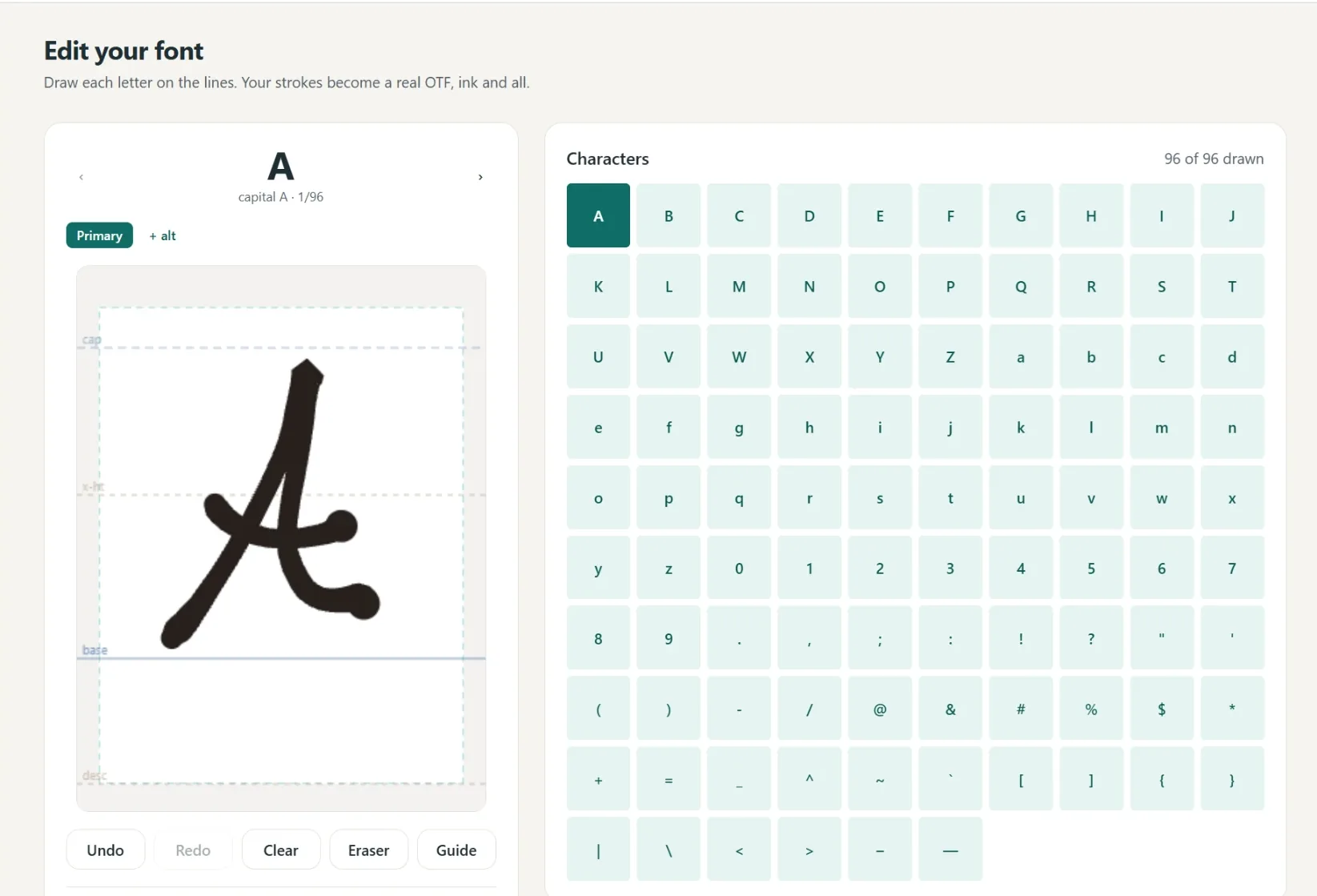
A font in your own hand
- Write full lines, we split out every letter
- Caps, lowercase, numbers and punctuation
- Fine or Bold pen weight, previewed live
- Cursive alternates connect automatically
- 1
Write it
A few short lines, or letter by letter.
- 2
We build it
Strokes become a real font.
- 3
Preview
Test words and pen weight.
- 4
Borders
Auto-spaced, tweak by hand.
- 5
Download
Standard and single-line.
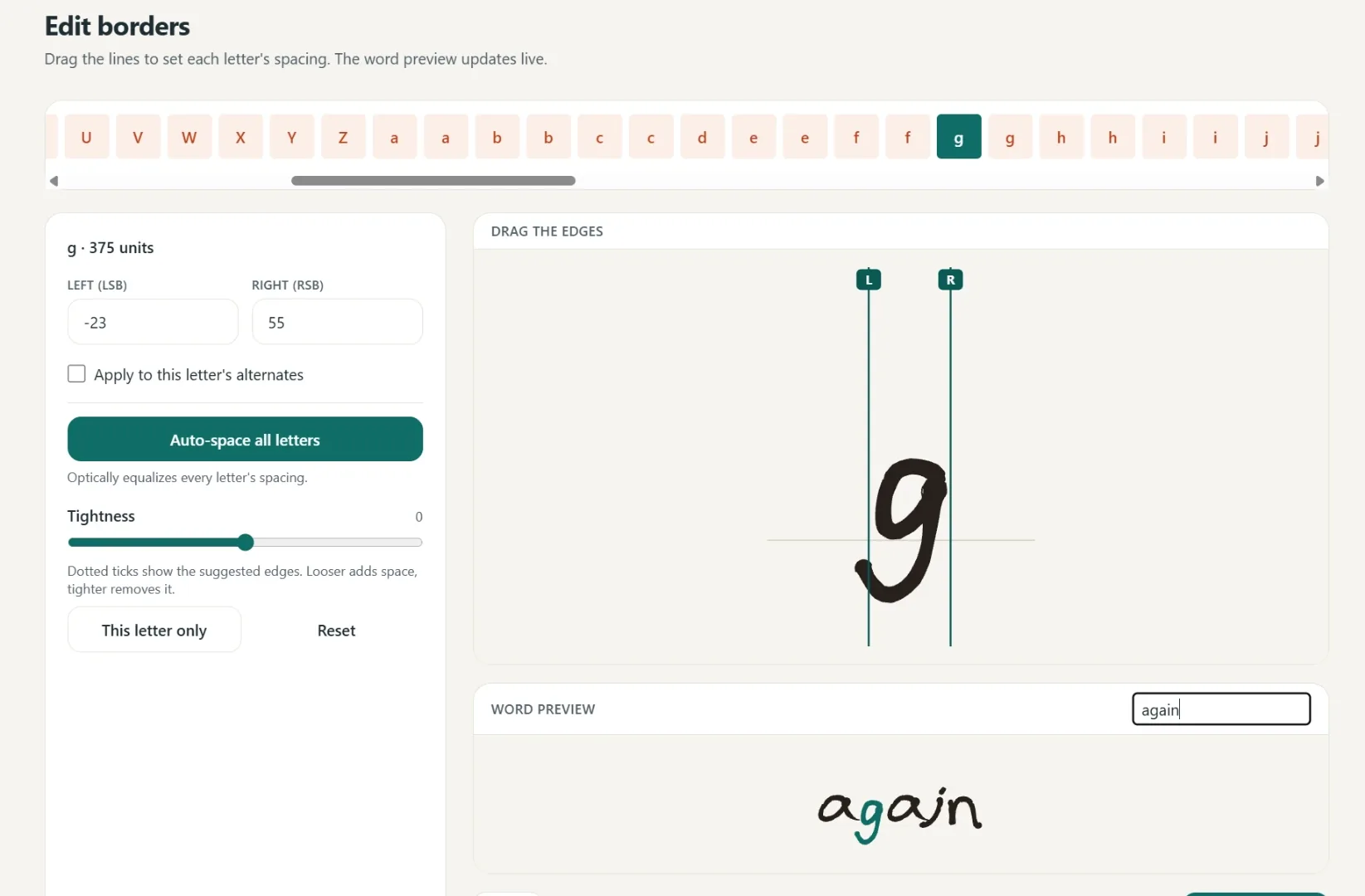
Spacing that starts smart
Borders are placed automatically, then you fine-tune any letter by hand.
One click equalizes every letter.
Drag the borders until it looks right.
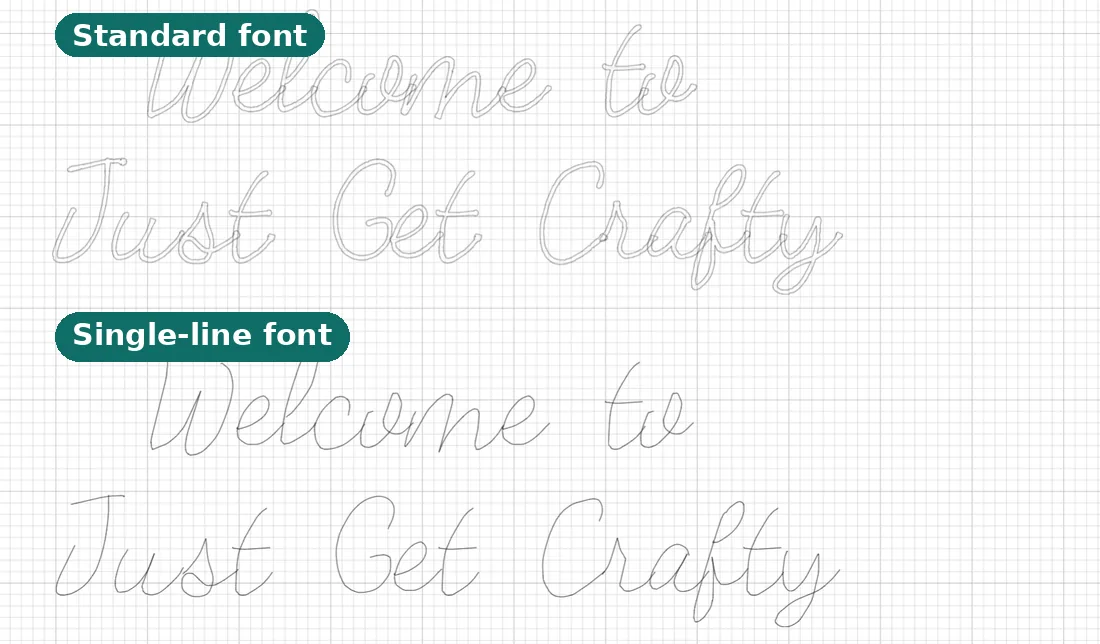
Two files, ready to make
Use it in Cricut or any app that takes fonts.
- Standard font
Full-outline, for everyday text.
- Single-line font
Plotter strokes, one clean pass.
- Yours to keep
Install it like any other font.
Questions, answered
How do I score text on a Glowforge instead of engraving it?
Bring the text in as artwork (an SVG), then set that step to Score in the Glowforge app. Score follows the line once at high speed. The catch is the artwork must be single-line: normal fonts score as hollow outlines, which is what the files from this page fix.
Do I need Glowforge Premium to use my own fonts?
No. Premium only affects the app's built-in text tool. An uploaded SVG of your words is ordinary artwork, and the free plan uploads it fine, so you can use any font here, any font you convert, or your own handwriting.
How much faster is scoring than engraving for text?
Engrave rasters back and forth across every letter like a printer, so a name can take many minutes. Score traces each stroke once, so the same name usually finishes in seconds. The look is a crisp engraved line rather than a filled block.
Can I make scored text look solid?
Yes, choose the hatch fill option when you download. The letters come packed with parallel score lines, so they read as solid while every line still runs at Score speed.
What size will my text be on the Glowforge bed?
The size you chose. You set the capital letter height in millimetres before downloading, and the SVG carries its physical size, so the Glowforge app places it at true scale.
Can I score my own handwriting?
Yes. Make a font from your handwriting once with the handwriting font generator, then download any message in it as an SVG and set it to Score. Gift tags and keepsakes in your actual hand.
Related tools and guides
Ready to make something?
Draw it, preview it, and keep it when you love it. Pro adds unlimited fonts, the full ready-made shelf, and clean SVG exports.
No credit card needed to start.