Inkling
Most downloadedNo font install needed, grab a sample as a ready-to-cut file: SVG · DXF
4 true single-line fonts you can download right now. No account, no email, no watermark. Each one writes as one clean pen stroke on Cricut pens, foil quills, pen plotters, and engravers, and most come with a matching normal weight for everyday type.
Want more? A free account unlocks 67 more fonts, still free, no card needed.
Really free: personal and commercial craft projects included.
Already love a font? Drop its OTF or TTF here and watch every letter become one clean pen stroke, then type your own words with the result, free. When you want the installable single-line font file, that is where your account comes in. The ready-made free fonts are just below.
Upload any OTF or TTF, watch every letter become one clean stroke, and type your own words with it. Free, no account needed. The installable OTF is Pro.
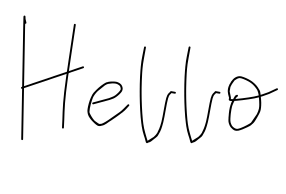
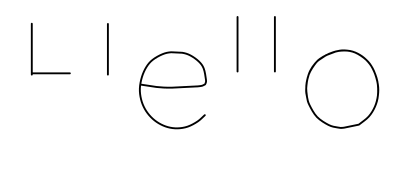
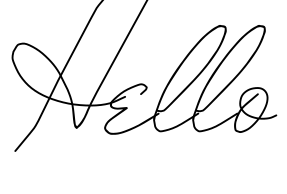
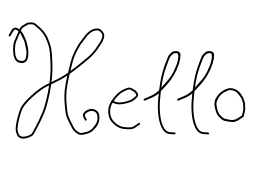
Most downloaded first. Every preview below is the real font file, and the single-line view is exactly the path your pen will follow.
71 fonts
No font install needed, grab a sample as a ready-to-cut file: SVG · DXF
No font install needed, grab a sample as a ready-to-cut file: SVG · DXF
Based on Quicksand Light by Andrew Paglinawan · SIL Open Font License 1.1. Credits
No font install needed, grab a sample as a ready-to-cut file: SVG · DXF
Based on Mr De Haviland by Alejandro Paul (Sudtipos) · SIL Open Font License 1.1. Credits
No font install needed, grab a sample as a ready-to-cut file: SVG · DXF
Based on Butterfly Kids by Font Diner (Tart Workshop) · SIL Open Font License 1.1. Credits
The license, in plain words: our own fonts are free for personal and commercial craft projects, including finished items you sell. Some fonts here are open-source picks we redistribute under their original licenses, each credited on our Fonts & Licenses page. Every font we drew ourselves was made with the same tool you can use free.
Our most downloaded fonts live here, in order. Same deal as above: true single-line weight plus a normal weight, personal and commercial craft use included. These just ask you to be signed in to download. The account is free, takes under a minute, and needs no card.
Based on Parisienne by Brian J. Bonislawsky (Astigmatic) · SIL Open Font License 1.1. Credits
Based on Kalam by Indian Type Foundry · SIL Open Font License 1.1. Credits
Based on Josefin Sans Light by Santiago Orozco · SIL Open Font License 1.1. Credits
Based on League Script by Haley Fiege · SIL Open Font License 1.1. Credits
Based on Caveat by Impallari Type · SIL Open Font License 1.1. Credits
Based on Crafty Girls by Font Diner (Tart Workshop) · Apache License 2.0. Credits
Already have an account? Log in and every card above becomes a download button.
Draw your letters once and get a font of your own handwriting, plus its single-line twin. Free to try, no account needed to start.
On a pen plotter, laser, or CNC there is even less to do: these are normal TTF files, so install one and type in Inkscape, Lightburn, or your plotter software like any other font.
The full walkthrough lives in How to use single line fonts in Cricut Design Space, and if your pen is drawing hollow letters right now, here is the one-step fix.
Yes, every font on this page is free in both the single-line and the normal weight, with no watermark. The first shelf downloads with no account at all. The fonts further down are free too, you just need a free account (no card, no trial) to download them. You pay only for tools that work on your own files, like the installable version of a font you convert or draw.
Yes. Use them for personal and commercial craft projects, including finished items you sell on Etsy or at markets. The only thing you cannot do is resell or re-upload the font files themselves.
Any machine that draws or scores along a path: Cricut pens and foil quills (Maker, Explore, Joy, Venture), Silhouette sketch pens, pen plotters like AxiDraw and NextDraw, and laser or CNC engravers running Lightburn or Glowforge.
Download the .ttf, double-click it, and click Install (Mac and Windows both). Then restart your design software, Cricut Design Space included, and the font appears under System fonts.
Check the Operation setting: it must be Draw / Pen, not Basic Cut. If the text is set to cut, Design Space traces the outline no matter which font you use. Our bubble-letters guide walks through the fix in one step.
Each letter is stored as one thin stroke, the path a pen would take, instead of a filled outline shape. That is why a pen writes it in one clean pass rather than outlining a hollow letter and leaving the middle empty.
Yes, both. The converter on this page turns any OTF or TTF into a single-line version you can preview free, and the handwriting font generator builds one from letters you draw in the browser, no scanner needed.
Yes, the shelf grows all the time. New fonts usually land on the free-account shelf first, so a free account is the way to see everything. Each new font shows up on this page automatically, in both weights, free like the rest.
Why pens bubble, and the Design Space setup that fixes it.
The same single-stroke idea, tuned for foiling.
One clean path for Glowforge, Lightburn, and CNC.
For AxiDraw, NextDraw, EleksMaker, and friends.
Every house font with its own page and big preview.
The step-by-step walkthrough with the gotchas.
Draw each letter once and we build the font, the normal weight and the single-line twin together.
No account needed to try.