
Single line fonts for engraving
When you engrave text, you want the laser or bit to follow one clean centerline, not outline each letter and fill it in, which is slow and looks heavy. A single-line font gives you exactly that. Make your own or convert any font for Glowforge, Lightburn, xTool, and CNC.
- One clean centerline per letter, so engraving is fast and crisp
- Make your own font or convert an existing OTF or TTF
- Great for Glowforge, Lightburn, xTool, and CNC routers
- Ready-made fonts are free to download, no account
Free to try, no account needed. Pay only when you keep a font. Prefer a ready-made font? Download one free.
Your handwriting, engraved as one clean line
Draw your letters on screen, nothing to print or scan. You get a normal font for typing and a single-line one that your engraver writes in one clean stroke, the way you do.
- Draw with a mouse, a tablet, or your finger on a phone
- Two fonts back: a standard one, plus the single-line version for the pen
- Free to draw and preview, pay only when you keep it
See your name in your handwriting
Nothing leaves this pageType a short word, then draw just those letters. It becomes type instantly.
Have a font you already love? Convert it
Upload any OTF or TTF and see every letter redrawn as one centerline the machine follows in a single pass. Free to try, no account needed.
See what single-line means
The same font twice: as normal type, and as the one clean line a pen or engraver actually follows. Type your own words.
Convert your own font
Upload any OTF or TTF, watch every letter become one clean stroke, and type your own words with it. Free, no account needed. The installable OTF is Pro.
See your words as one engraving pass
Single-line fonts: the machine follows one centerline per letter instead of outlining it.
Loading fonts…
Or skip the font: download your text ready to engrave
Type it, pick a font and letter height, and take the file straight to your machine. SVG for lasers, DXF for CNC.
Want this in your own handwriting, or in a font you already own? Make a handwriting font or convert any font.
Why engravers want a centerline, not an outline
Point a laser at text set in a normal font and the software has two bad options: score around the outline of each letter, which reads as hollow skeleton text, or fill-engrave the whole letter, which rasters back and forth hundreds of times and turns a two-minute name into a twenty-minute job with charred edges. A single-line font gives the machine a third option that is actually right: one clean vector path down the middle of every stroke, engraved in a single line-mode pass. It is faster by an order of magnitude and it looks like fine engraving instead of burned-in bubble letters.
The same logic applies to CNC routers and drag engravers: a V-bit or diamond tip following one centerline produces the classic engraved look you see on jewelry and trophies.
Find your machine
The principle above is the same everywhere, but the settings, the file format, and the traps are not. Each machine has its own walkthrough:
- LightBurn for SVG and DXF import, Line mode, the SHX question, and hatch fill.
- Glowforge for scoring instead of engraving, and why you do not need Premium.
- CNC routers and drag engravers for DXF into Fusion 360, VCarve, Easel, and Carbide Create.
Personal beats packaged
Engraving is usually personal: names on cutting boards, a message inside a ring box, coordinates on a keychain. That is exactly where engraving in your own handwriting lands differently than a stock font. Draw your letters once in the handwriting font generator and every future gift is your hand, engraved. Prefer a polished look? Convert any font you own with the font to single line converter or grab a ready-made one free from the free single line fonts page.
The setting that makes text single-line in each app
The font already supplies one clean path per letter. You just tell your machine to follow the line instead of filling the shape.
| Machine or software | Set the text to | What happens |
|---|---|---|
| Lightburn (laser) | Line mode, not Fill | Traces each centerline once, so a name burns in seconds |
| Glowforge | Score, not Engrave | Follows the path instead of raster-filling every letter |
| xTool (laser) | Line or vector score | One clean pass per stroke, with no double-burned overlaps |
| CNC router or drag engraver | Follow the path with a V-bit or diamond tip | A single engraved groove, the classic trophy and jewelry look |
Turn your handwriting into a font
Write a few short lines and we split them into letters, or draw letter by letter. Either way you get two fonts: a standard one for type and a single-line one for your plotter.
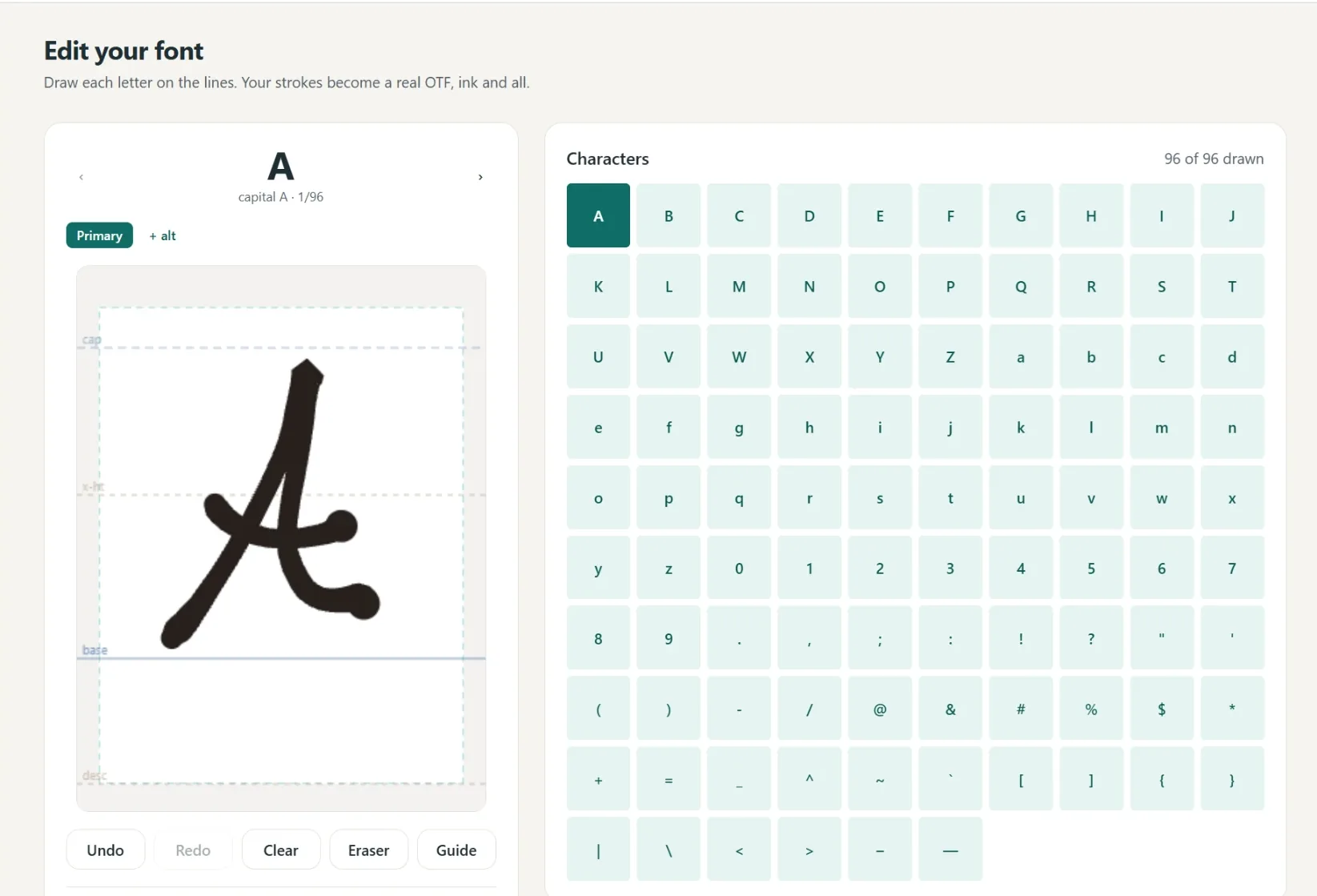
A font in your own hand
- Write full lines, we split out every letter
- Caps, lowercase, numbers and punctuation
- Fine or Bold pen weight, previewed live
- Cursive alternates connect automatically
- 1
Write it
A few short lines, or letter by letter.
- 2
We build it
Strokes become a real font.
- 3
Preview
Test words and pen weight.
- 4
Borders
Auto-spaced, tweak by hand.
- 5
Download
Standard and single-line.
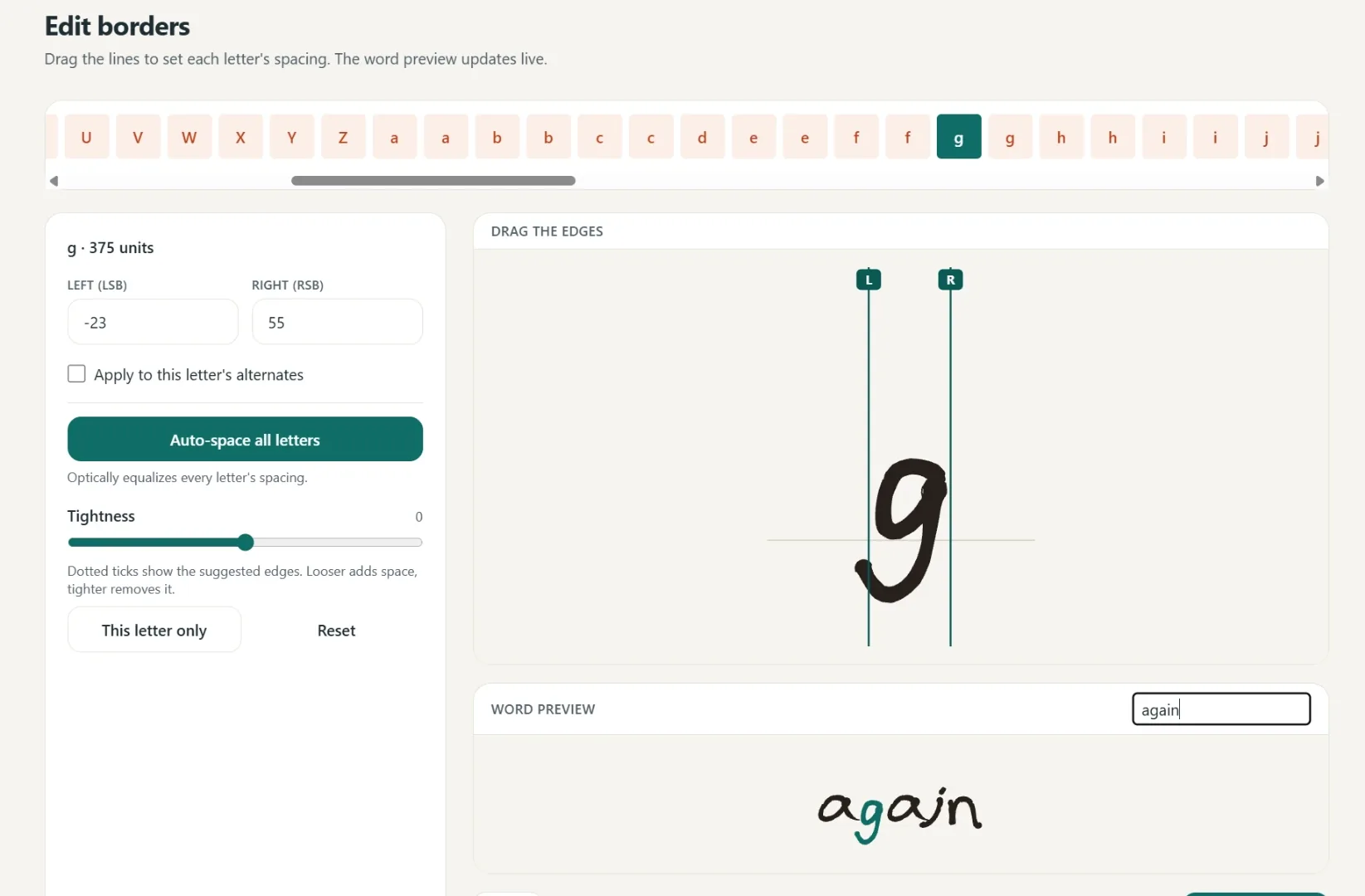
Spacing that starts smart
Borders are placed automatically, then you fine-tune any letter by hand.
One click equalizes every letter.
Drag the borders until it looks right.
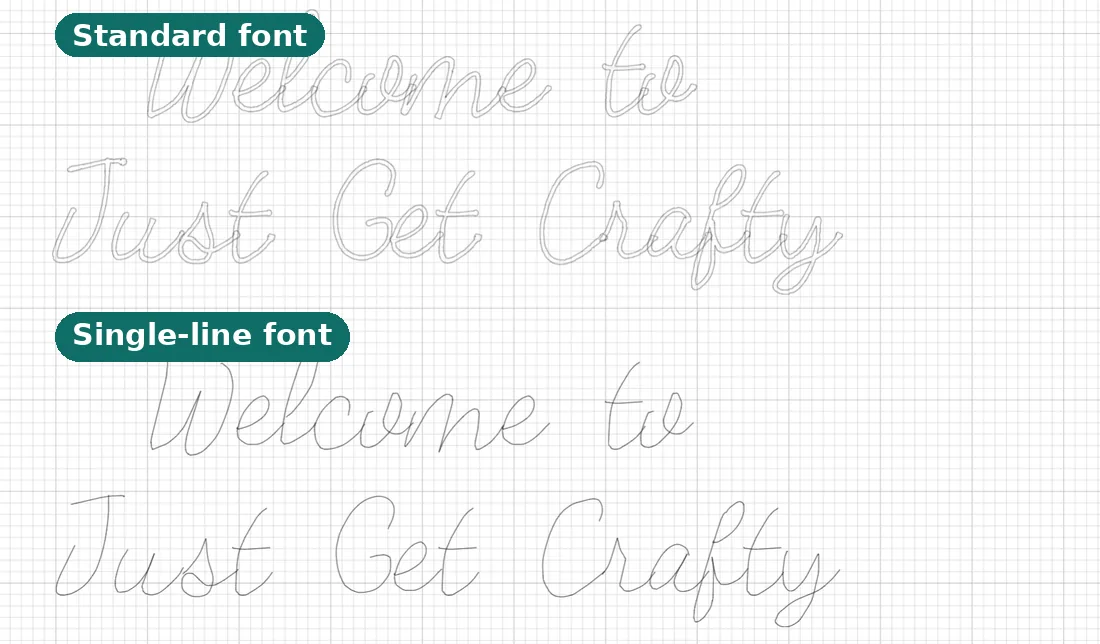
Two files, ready to make
Use it in Cricut or any app that takes fonts.
- Standard font
Full-outline, for everyday text.
- Single-line font
Plotter strokes, one clean pass.
- Yours to keep
Install it like any other font.
Questions, answered
Why is a single-line font better for engraving?
A normal font is a filled outline, so the machine engraves around each letter and fills it, which takes longer and looks bold and blocky. A single-line font is one path, so the tool writes each letter once, like handwriting.
Which engravers does this work with?
Any tool that engraves from a vector path, including Glowforge, xTool, Lightburn-driven lasers, and CNC routers. You download a single-line file the software follows.
How do I set it up in Lightburn?
Install the font, type your text in Lightburn, and set the layer mode to Line rather than Fill. Because each letter is one open path, the laser scores it in a single clean pass.
Does it work on a Glowforge?
Yes. Set the text to Score instead of Engrave and the Glowforge follows the single-line path, which is much faster than fill-engraving each letter.
Can I engrave my own handwriting?
Yes. Draw your letters once in the handwriting font generator and every future project can be engraved in your own hand, which makes gifts feel genuinely personal.
Can I convert a font I already use?
Yes. Upload any OTF or TTF and we produce a single-line version. You can preview it free before downloading.
Can I skip installing a font and just download my text?
Yes. Every free font here can set your words and hand them back as a ready-to-cut SVG or DXF at the letter height you choose, no font install and no account. Look for the SVG and DXF links next to each font, or use the machine pages for LightBurn, Glowforge, and CNC.
Related tools and guides
SVG, DXF, and SHX routes for LightBurn lasers.
Score names in seconds instead of engraving for minutes.
DXF text for Fusion 360, VCarve, and Carbide Create.
Any OTF or TTF becomes an engraving-ready version.
The plain-English explanation, with pictures.
Engrave gifts in your own handwriting.
A photo of a recipe card, engraved on a cutting board.
Ready to make something?
Draw it, preview it, and keep it when you love it. Pro adds unlimited fonts, the full ready-made shelf, and clean SVG exports.
No credit card needed to start.