
What Is a Single Line Font? (And Where to Get One)
June 30, 2026 · Updated July 11, 2026
A single line font is a font where each letter is one thin line, not a filled shape, so a pen, foil quill, plotter, or engraver can write it in a single pass instead of tracing a hollow outline. If you use a Cricut pen, pen plotter, foil quill, or engraver, this is the one kind of font you actually need. Consider this the plain-English hub for the whole idea: what it means, the many names it goes by, why regular fonts fail on a pen, how to spot a real one in ten seconds, the file formats behind it, and the three ways to get one on this site.
The short version: A regular font stores each letter as a filled outline, which has two edges. A single line font stores just the centerline of each stroke, which is one line. A pen, foil tip, or engraving bit follows a line, so it needs the single line version. If your tool holds a blade, use a normal font. If it holds a pen, quill, or tip, use a single line font, and confirm it is a real one with the zoom test below.
The definition, with a picture in your head
Open any normal font file and each letter is stored as a shape: the outline of the letter, which your screen fills in with color. That is perfect for reading and for cutting, because a blade follows the edge of a shape.
A single line font stores something different: the path a pen would take to write the letter. An "l" is one stroke. A "t" is two. There is no outline and no fill, just the centerline of each stroke. The idea is old and has picked up a pile of names along the way, which is why the same thing can look like several different products in a font shop.
| Name you see | Where you hear it | Same idea? |
|---|---|---|
| Single stroke / single line | Cricut and craft blogs | Yes |
| Monoline | Font marketplaces | Yes, if it is truly one line |
| Writing font | Cricut, Silhouette | Usually, but verify |
| Sketch font | Design tools | Yes |
| Engraving / technical font | CNC and laser software | Yes |
| Hershey font | Plotters, Inkscape, engraving | Yes, the original |
All of them mean one line per stroke. The one to watch is "writing font," because that label gets stuck on plenty of fonts that are not truly single line. More on that in a moment.
Why normal fonts fail on machines that draw
A pen can only follow a line. Give it an outline font and the only lines available are the edges of each letter, so the machine dutifully traces around the outside and leaves the middle empty. That is where hollow bubble letters come from on a Cricut, and it is why plotted text takes about twice as long as it should: the pen draws both sides of every stroke instead of one.
A single line font has one centerline to follow, so the pen writes the letter the way a person does. The result looks hand-lettered because, mechanically, it is: one smooth pass per stroke, with the pen's own ink character showing.
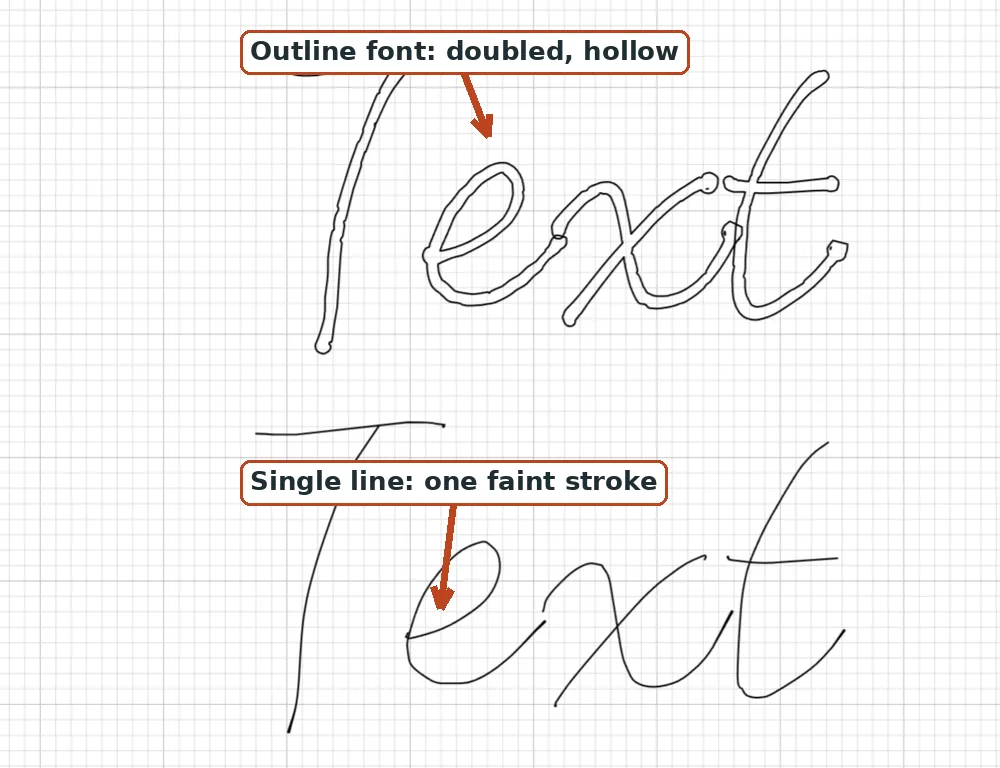
If your Cricut is doing the bubble-letter thing right now, the quick fix is in Why is my Cricut writing in bubble letters?
Real vs fake: the zoom test
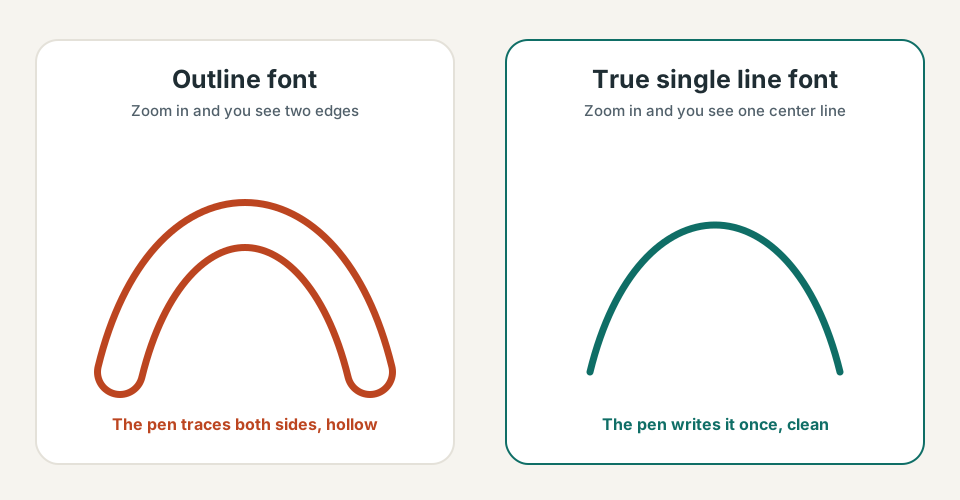
Here is the trap: a thin font is not the same as a single line font. Plenty of fonts marketed as "writing fonts" are just skinny outline fonts, and a pen still traces around them, leaving a narrow hollow channel that reads as doubled. A wide marker tip can bridge that tiny gap and fool you into thinking it worked.
The test takes ten seconds. Type a letter big, zoom in, and look at one stroke.
| What you see when you zoom in | What it is | What the pen does |
|---|---|---|
| Two edges with a gap between them | Outline font | Traces both sides, leaves it hollow |
| One center line | True single line font | Writes it once |
| A very thin outline (two edges, close together) | Skinny outline font | Still traces both edges; a wide tip just hides the gap |
If you take one thing from this page, take the middle column. One centerline means real. Two edges means outline, no matter how thin.
Why a single line font can look invisible on screen
Before you panic: because a true single line font has no fill, it often looks faint, hairline-thin, or even invisible in some apps after you install it. Nothing is wrong. The reason lives in the file format, and it is worth understanding once so it never scares you again.
Standard TTF and OTF font files are defined by closed contours only. A closed contour is a loop: it has to start and end at the same point so software can fill it. A single open line, the exact thing a pen wants, is not something these formats can store as-is. This is a limitation of the format, not a design choice, which is why a perfect installable single line font is genuinely hard to build.
The common workaround is a "there and back" path. The stroke runs down the middle, then returns on top of itself, so the contour technically closes with effectively no interior. There is nothing to fill, so a screen shows a hairline or nothing at all, while a real pen or tool draws that path as one clean pass down the center. It is why installed single line fonts read best at larger point sizes, roughly 36pt and up, where the tiny path is easier to see and select. This applies to any installable single line OTF, ours included; it is expected, not a defect.
The way to avoid the invisible-preview problem entirely is to work from a plain SVG for a single design instead of an installed font. An SVG can hold a real open line, so you see exactly what will be drawn. That is one reason our image to single-line SVG converter traces an image straight to a single pen line you can see on the mat.
The file formats, briefly
You do not need to memorize this, but knowing which format holds a real open line explains a lot of "why won't this work" moments.
| Format | Stores a true open line? | Read by |
|---|---|---|
| TTF / OTF (there-and-back trick) | No, it fakes it | Cricut, Silhouette, most software |
| OpenType-SVG (OTF-SVG) | Yes | A limited set of apps |
| OPF (Open Path Format) | Yes | Some cutting software, such as Sure Cuts A Lot v5 and later and StarCraft Solo |
| SVG font (Hershey) | Yes | Inkscape's Hershey Text extension |
| Plain SVG, one per design | Yes | Cricut, Silhouette, ScanNCut, plotters (the most portable route) |
The takeaway: for a whole typeface you want to type with, an installed single line OTF or TTF is the convenient choice. For a single project where you want to see the line and not fight software support, a plain SVG per design is the most portable option. No one format is supported by every machine, so match the format to the tool.
The Hershey fonts, the original single line
The whole idea has a founding story. Around 1967, Dr. Allen Vincent Hershey at the U.S. Naval Weapons Laboratory in Dahlgren, Virginia, hand-built a set of fonts that drew each letter as line segments, so early vector CRT displays could render text. Coordinates for 1,377 occidental glyphs were later published by the National Bureau of Standards as Special Publication 424 in 1976.
Those Hershey fonts are why "engraving font" and "single line font" are often the same conversation. They are still the standard for pen plotters, CNC, and laser engraving today. Inkscape ships a Hershey Text extension (included since around version 0.91) that renders text in these stroke fonts using the SVG font format. If you have ever engraved a name plate or plotted a quote, you have probably used Hershey's work.
Where single line fonts are used
- Cricut pens and the foil systems, for cards, envelopes, tags, and place cards that look hand-written. See single line fonts for Cricut for the full setup, and addressing envelopes with Cricut for a whole guest list at once.
- Pen plotters like AxiDraw, its successor NextDraw, and EleksMaker, where all text has to be drawable line work because there is no blade to trace an outline with. More on our pen plotter fonts page.
- Laser and CNC engraving, where a single centerline cuts one clean groove in one pass instead of outlining every letter. Details on the engraving fonts page.
- Foil quills and foil transfer, the pickiest of all; the foil quill fonts page covers why.
How to use one in Cricut Design Space
The exact steps live in how to use single line fonts in Cricut Design Space, but here is the one setting that matters. Type your text, select it, then change Operation from Basic Cut to Pen (Draw). That is the menu that tells the machine to write instead of cut. (Older versions of Design Space called this menu Linetype, so if that is what you see, it is the same thing.) The Draw-type operations include Pen, Foil, Score, Deboss, and Engrave.
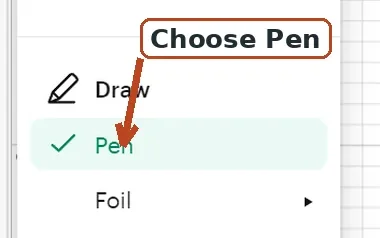
One point that trips people up: Cricut's built-in Writing style toggle only appears for Cricut Access fonts, not for fonts you install from your own computer. For an installed single line font you skip the Writing toggle entirely and just set the Operation to Pen or Draw. And a nuance worth keeping honest about: Cricut's own Writing-style fonts are double-line writing fonts. They look hand-lettered, but they are still drawn as a thin traced path, not one true centerline. They write nicely, but "writing style" is not the same promise as "single line," which is exactly why the zoom test earns its keep.
| Tool | Cricut Operation | Needs a true single line? |
|---|---|---|
| Cricut pen or marker | Pen (Draw) | Yes |
| Foil Quill or Foil Transfer | Foil | Yes |
| Engraving tip | Engrave | Yes |
| Scoring wheel or stylus | Score / Deboss | No (that is a path, not a font) |
| Blade | Basic Cut | No (use a normal outline font) |
Foil and engraving, a little deeper
Foil. Both common tools follow the exact path a pen would, so both need real single line art or they will foil a hollow outline. The difference is how they lay the foil down: the We R Memory Keepers Foil Quill is heat-activated (you plug it in and it melts foil along the path), while the Cricut Foil Transfer System uses pressure, not heat. For the fonts that behave best under a hot or pressed tip, see best fonts for foil quill.
Engraving. With the Cricut Maker engraving tip, set Operation to Engrave and use a single line font so the tip cuts one clean groove instead of scratching an outline around each letter. It engraves soft metals such as aluminum, brass, and copper (aluminum blanks are a common starter). The engraving fonts page has material notes.
Troubleshooting the common gotchas
- The text is hollow. You set a normal outline font to Pen or Draw. Swap in a real single line font, or for a Cricut Access font switch the Style to Writing.
- The font looks invisible after installing. Expected for a true single line OTF. Type at 36pt or larger and preview with the Operation set to Draw so you can see the line.
- Tiny gaps still show. A slightly wider pen tip hides them. Cricut tips are typically around Fine Point 0.4mm (marked F), Extra Fine 0.3mm (XF), and Markers about 1.0mm (M); lineups drift, so treat those as ballpark. A marker reads as one clean stroke where a very fine tip might show the seam.
- Tempted to "fill" an outline font with offsets or duplicate text. It sort of works, but it uses more ink, roughly doubles the draw time, and still is not a real single line. A true single line font is the clean fix.
Three ways to get one on this site
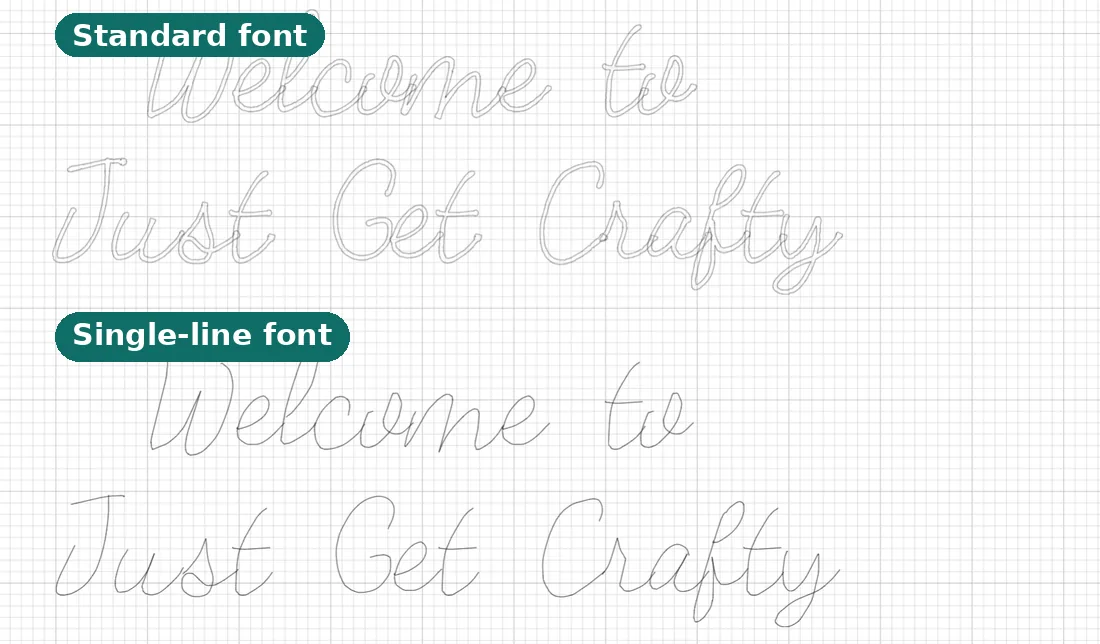
Download a ready-made one, free. Our free single line fonts are real handwriting fonts you can download with no account, each in a normal weight and a true single-line weight. Commercial craft use is allowed; just do not resell the font files. Preview them with your own words first, then install, type, and write. Browse the whole set in the font library.
Convert a font you already love. The font to single line converter takes any OTF or TTF and traces each letter down to its centerline, keeping the original spacing. This is the move when your project already has a font picked out, and it beats hand-tracing letters in Illustrator or Inkscape. Results depend on the source: clean for monoline and script fonts, rougher for high-contrast serif fonts, so preview before you commit.
Make one from your handwriting. The handwriting font generator lets you draw each letter in the browser (no printing, no scanning) and builds both a regular font and the single-line version automatically. For gifts, envelopes, and anything personal, your own hand beats any downloaded font. Here is how to make a font from your handwriting, and if you have compared tools, how we stack up against Calligraphr.
Everything is free to create and preview. Ready-made fonts download free with no account. Pro is $6/month or $48/year and unlocks the commercial license plus clean, watermark-free downloads and exports of what you make. You can start drawing and previewing without an account. Plotting a big run? Our plotter SVG optimizer reorders the strokes so the pen wastes less travel.
Frequently asked questions
Is a thin font the same as a single line font?
No. A thin font is still an outline with two edges, so a pen traces both sides and leaves a hollow channel. Only a font whose strokes are a single centerline is a true single line font. Confirm it with the zoom test: one center line, not two edges.
Why does my single line font look invisible or super thin after I install it?
That is normal. A true single line OTF stores a zero-width, there-and-back path with no fill, so it looks hairline or invisible on screen and only gains width when a real pen or tool draws it. Type at 36pt or larger and preview with the Operation set to Pen or Draw.
Are Cricut writing fonts single line fonts?
Not exactly. Cricut's Writing-style fonts are double-line writing fonts that look hand-lettered but are drawn as a traced path, not one true centerline. Many fonts sold elsewhere as "writing fonts" are the same, so always zoom-test before you trust the label.
Can a single line font be a TTF or OTF file?
Sort of. TTF and OTF only allow closed contours, so single line fonts fake it with a path that runs down the stroke and back on itself. It installs and types like a normal font, but it looks hairline-thin until a pen or tool actually draws it.
What is a Hershey font?
The original single line vector fonts, built around 1967 by Dr. Allen Hershey at the U.S. Naval Weapons Laboratory to draw letters as line segments on early vector displays. They are still used for engraving and plotting today, notably through Inkscape's Hershey Text extension.
Can I convert a regular font into a single line font?
Yes. A converter traces each letter down to its centerline and keeps the original spacing. Quality varies by source: clean for monoline and script fonts, rougher for high-contrast serif fonts. Try our font to single line converter and preview the result before you download.
What format should a single line font be in for Cricut?
For a whole typeface, an installed OTF or TTF single line font works: set the Operation to Draw. For one-off designs, upload a plain SVG and set it to Pen or Draw, which sidesteps the invisible-font issue because you can see the line the whole time.
The one-sentence summary
If a machine holds a blade, use a normal font. If it holds a pen, quill, or engraving tip, use a single line font, and check with the zoom test that it is a real one. That single habit, checking for one centerline instead of two edges, will save you more ruined cards and place settings than any other tip on this page.
Try it while you're here
Your words in real fonts made from real handwriting with this tool.
Loading fonts…
Upload a font and get a true single line version for pens, plotters, and engraving.
Convert any font to single lineFree to try, no account needed. Pay only when you keep a font.