
Fonts That Write, Not Cut: Picking the Right Font for Cricut Pens
July 6, 2026 · Updated July 11, 2026
If your Cricut project involves a pen, you need a font that writes; if it involves a blade, you need a font that cuts; and the confusing part is that most fonts, including many labeled "writing fonts," are actually cutting fonts in disguise. Here is how the three kinds really differ, how to tell them apart in ten seconds, how to set them up in Design Space, and how to pick (or make) the right one for whatever you are building.
The quick version
- A pen traces the edge of a shape, so a normal font writes as hollow bubble letters, not solid strokes.
- A true single-line font stores one path down the middle of each stroke, so a pen writes it in one clean pass. It is the only kind that genuinely writes.
- "Writing font" is a marketing label; single line is a fact about the file. Plenty of "pen fonts" are just thin outline fonts that still double up.
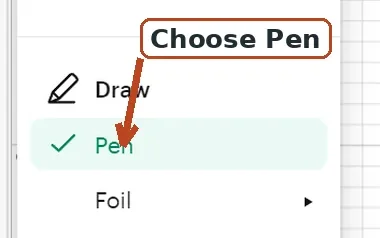
- In Design Space, set the text layer's Operation to Pen (older versions and Cricut Joy call it Draw). Leave a real single-line font's Style on Regular.
- To write and cut in one project, use Attach, never Weld.
The three kinds of font, honestly
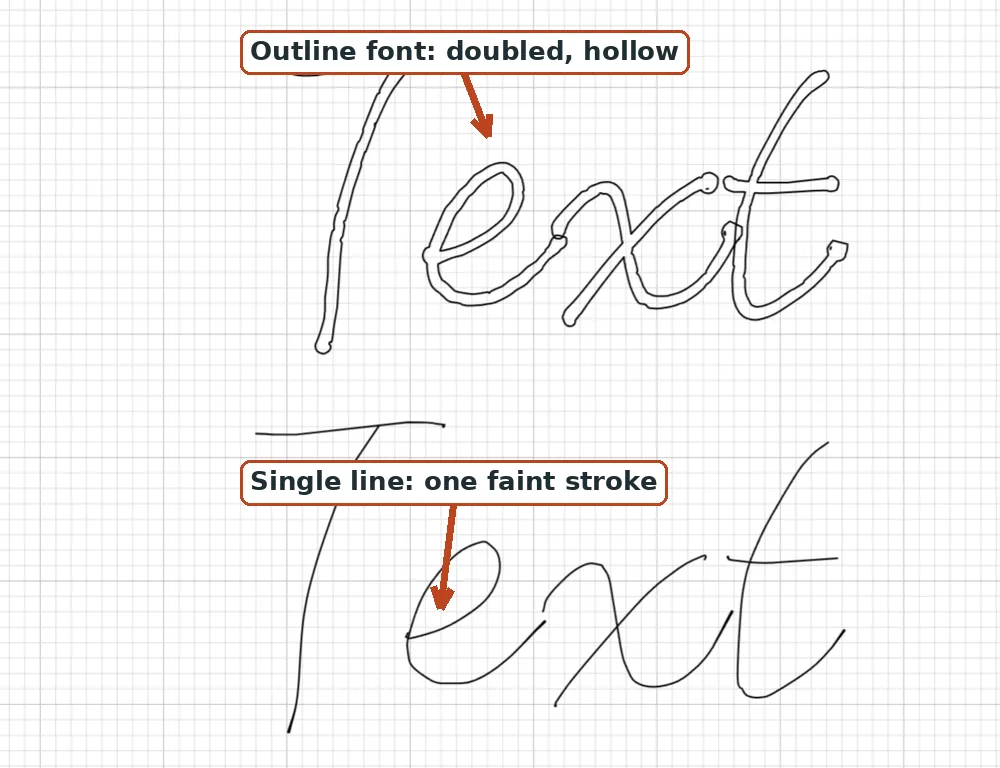
Cutting fonts (that is, normal fonts). Nearly every font ever made stores each letter as a filled outline shape. Blades love them, because a blade follows the edge of a shape and cuts the letter out. Pens do not, because tracing that same edge walks around both sides of every stroke and leaves the middle empty. If you have ever gotten bubble letters from a pen, this is the whole reason, and it is structural, not a setting you forgot.
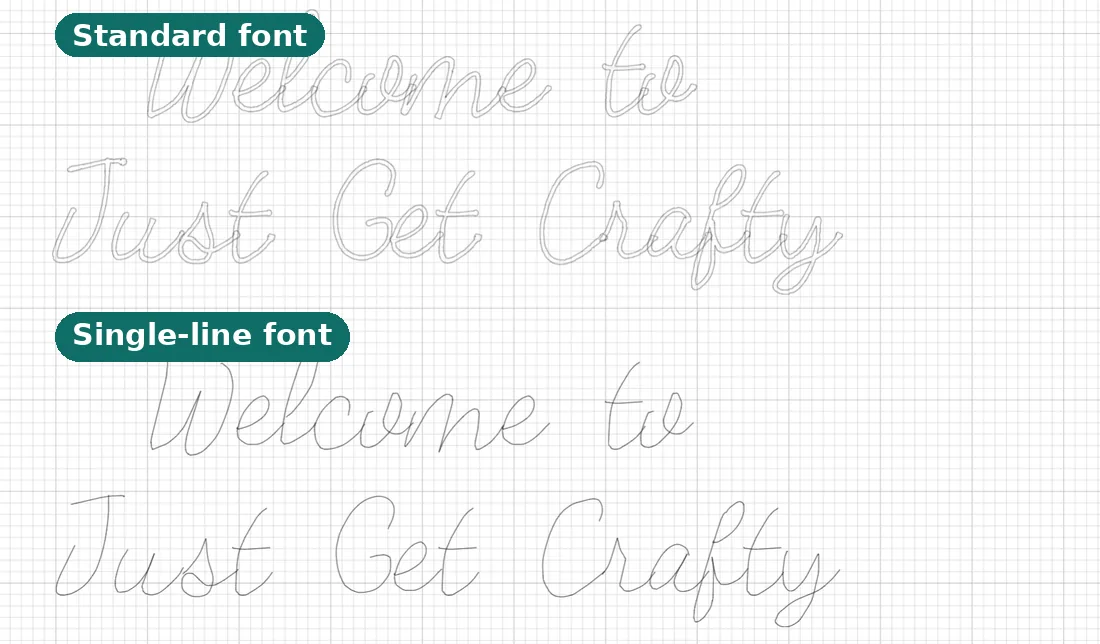
"Writing style" fonts. Design Space has a writing-style filter, and fonts tagged with it are drawn thin so they look better with a pen. Some of Cricut's own writing-style fonts are genuinely single-stroke; many others, and almost everything sold as a "pen font" elsewhere, are just skinny outline fonts. The pen still traces two edges, the two lines just sit close together, and small text still fills in solid. Test any font before you commit a whole project to it.
True single-line fonts. Each letter is stored as one stroke down the middle, the path a hand would take, with no outline and no fill. A pen writes it in one pass, a foil tool foils it evenly, and an engraver scores it cleanly. This is the only kind that genuinely writes. The full explainer lives at What is a single-line font?.
| Font type | What the file stores | Zoom test | On screen | Writes and foils cleanly? | Best for |
|---|---|---|---|---|---|
| Normal outline font | Closed, filled shapes | Two edges with a gap | Solid | No, comes out hollow | Cutting vinyl and cardstock |
| Skinny "writing" outline font | Thin closed shapes | Two close edges | Solid but thin | Not really, small text fills in | Larger drawn text, after testing |
| True single-line font | One centerline per stroke | One line, no gap | Hairline-faint | Yes, one clean pass | Writing, foiling, engraving |
The ten-second zoom test
Type one big letter, zoom all the way in, and look at a single stroke:
- You can see a left edge and a right edge with space between them: it is an outline font. A pen will trace both edges no matter what the marketing said.
- You see one centerline and nothing else: it is a true single-line font. The pen writes it once.
Bonus tell: after installing, a true single-line font often looks hairline-faint on screen, because there is no fill to display, only the centerline. Skinny outline fonts still look solid. Counterintuitively, the font that looks like almost nothing on your monitor is the one that writes beautifully.
Operation vs Style: the setting people get wrong
Two different Design Space controls trip everyone up, so pin them down:
- Operation tells the machine to use the pen instead of the blade. In current Design Space the menu is called Operation and the drawing choice is labeled Pen; older versions and Cricut Joy call it Linetype with a Draw choice. The default is Basic Cut. Set your text layer's Operation to Pen (or Draw) and the machine picks up the marker.
- Style has a separate Writing option, plus a Writing filter (the funnel icon) in the font panel. Selecting Writing only helps with Cricut's own fonts that ship a writing style: it swaps the glyphs to a single-stroke version.
Here is the part that matters: if you installed a true single-line font yourself, do not set Style to Writing. Leave it on Regular and just set Operation to Pen. The font is already single line. Forcing Writing style is a Cricut-font-only trick, and applying it to an ordinary installed font does nothing useful. Full setup walkthrough: How to use single-line fonts in Cricut Design Space.
Match the font to the project
| Project or goal | Font type | Operation | Attach? | Notes |
|---|---|---|---|---|
| Cards, envelopes, place cards | True single-line | Pen (Draw) | No | Size up ornate scripts so they don't read skeletal |
| Cut names from vinyl or cardstock | Normal outline | Basic Cut | No | What every font already wants to be |
| Foil quill or foil transfer | True single-line | Foil or Pen | No | Outline art gives doubled, hollow foil |
| Write and cut one tag | Single-line text plus outline shape | Pen plus Cut | Yes | Attach binds the two layers |
| Engraving | True single-line | Engrave | Sometimes | Maker family with the engraving tip |
| Pen plotter | True single-line | Plotter app | No | Load an SVG, not a Design Space font |
For a guest list or a stack of invitations, single line is what makes the whole run legible in one pass. See address envelopes with Cricut and wedding envelope addressing.
Write and cut in one project
Say you want a gift tag with a cut border and a written name. Put the name on the Pen operation and the border on a Cut operation, select both, and click Attach. Attach freezes their relative position and ties the draw layer to the cut, so the name lands exactly where you placed it. It is not literally simultaneous: the machine draws the name first, then pauses and prompts you to swap the pen for the blade, then cuts the border. One mat, one project, one tool swap.
Use Attach, not Weld, for this. Attach keeps the layers positioned and bound while leaving them as separate operations. Weld permanently fuses shapes into a single cut path, and once the project is closed you cannot undo it, so Weld would destroy your separate pen layer.
Pens, tips, and clamps
On Explore and Maker machines the pen goes in the accessory clamp, Clamp A, while the blade stays in Clamp B. On Joy and Joy Xtra you remove the blade housing and drop the pen into the single clamp. The full pen walkthrough covers loading and first-run tips.
Tip size changes how single-line text reads, especially when it is small:
| Tip or tool | Typical size | Best for | Watch-outs |
|---|---|---|---|
| Extra Fine (XF) | 0.3mm | Fine detail, small text | Can starve or fill in very small letters |
| Fine Point (F) | 0.4mm | Everyday writing | A reliable default |
| Gel or glitter | about 0.8mm | Bold, colorful accents | Too thick for tiny text |
| Marker (Infusible Ink) | about 1.0mm | Bold lines, Infusible Ink | Blobs small letters |
| Foil transfer tip | Fine, Medium, Bold | Pressure foiling | Needs single-line art |
| Engraving tip | varies | Scoring metal or acetate | Single-line art only |
If small single-line text looks starved or fills in, go up to a thicker tip or make the text larger. Clean sans-serif and serif single-line fonts stay legible small; ornate script single-line fonts look sparse when tiny and read best at a larger size.
One more thing: the pen color you choose in Design Space is only for on-screen preview and to remind you which pen to load. The machine does not sense ink color, so any physical pen writes any single-line font regardless of the color shown.
Which machines can write
| Machine family | Holds a pen? | Drawing operations | Pen clamp |
|---|---|---|---|
| Joy and Joy Xtra | Yes | Cut, Draw | Single clamp (remove blade housing) |
| Explore family | Yes | Cut, Pen (Draw), Score, Foil | Clamp A (accessory) |
| Maker family | Yes | Cut, Pen (Draw), Score, Foil, Engrave | Clamp A (accessory) |
| Venture | Yes | Cut, Pen, Foil | Accessory clamp |
Every current family holds a pen, and the font rule is identical on all of them: only a true single-line font (or a Cricut writing-style font) writes cleanly, while an outline font doubles up on every machine, including Joy.
Foiling wants single lines too
Cricut has two different foil tools, and both follow a path like a pen, so both want single-line art. The Foil Transfer System is a cold, pressure tool with QuickSwap Fine, Medium, and Bold tips; you use the Foil operation in Design Space on Explore, Maker, and Venture. The Foil Quill is a separate heat tool that plugs in and needs a few minutes to warm up. With an outline font, either one traces both edges and you get doubled, hollow foiling instead of one crisp line. Feed either tool a single-line font and each stroke foils once. More at best fonts for foil quill and our foil quill fonts page.
Where to actually get fonts that write
The honest answer is that true single-line fonts are rare in ordinary font marketplaces, because the standard OpenType and TrueType formats were built around closed, filled outlines. (OpenType-SVG can technically hold open paths, but essentially no cutting or engraving software reads them, so that is a dead end.) Your reliable options:
- Ready-made single-line fonts. Our free single-line fonts are handwriting fonts that each include a true single-line weight, free to download with no account. Preview them with your own words first, and browse the whole font library.
- Convert a font you already love. The font to single-line converter traces any OTF or TTF down to its centerlines and keeps the original spacing, so the writing matches the rest of your design. Quality depends on the source: clean for monoline and script faces, rougher for high-contrast serifs.
- Make one from your own handwriting. The handwriting font generator builds a normal font and a matching single-line font from letters you draw right in the browser. See how to make a font from your handwriting for the process.
One distinction that saves a lot of confusion: a single-line design is not the same as a single-line font. If you download an SVG or DXF file, you upload it to Design Space as an image, and you cannot type with it. Only an installed single-line OTF or TTF lets you type words as text. SVG loads a single-line design straight into Cricut, Silhouette, or LightBurn; DXF is the standard for CNC and CAM tools like Fusion 360 and VCarve. If you need to turn a picture into a single pen line, the image to SVG converter does exactly that.
Single line is older than Cricut
If it sounds like a modern gimmick, it is not. The original computer single-stroke fonts are the Hershey fonts, drawn around 1967 by Dr. Allen Vincent Hershey at the U.S. Naval Weapons Laboratory in Dahlgren, Virginia, for vector displays and pen plotters. The National Bureau of Standards later digitized and published the set, 1,377 characters, in 1976. Machines have been writing letters as single centerlines for well over fifty years, so you are using a proven format, not a workaround.
Troubleshooting
| Symptom | Quick workaround | Real fix |
|---|---|---|
| Pen draws hollow bubble letters | Apply a small negative Offset to fill the center, or duplicate the text for a double pass | Use a true single-line font |
| Foil comes out doubled | A thicker foil tip hides the gap a little | Single-line art, so each stroke foils once |
| Small text fills in or looks starved | Size the text up or use a thicker pen tip | Match font style to the size you need |
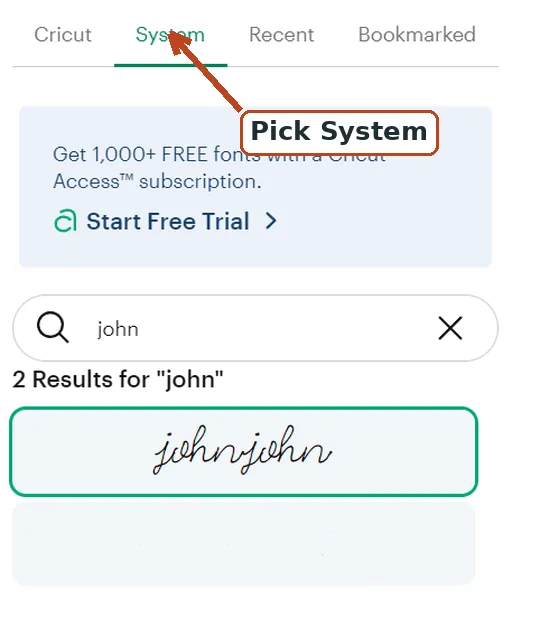
| Font won't appear in Design Space | Close and reopen Design Space to refresh | Look under the System tab, not the Cricut tab |
A couple of those need a word. The negative-offset and double-pass tricks make an outline font look filled, but they add passes and time and are not the same as a real single-line font, which avoids all of it. And installed system fonts always live under the System tab of the font menu, not the Cricut tab; if a font you just installed is missing, close and reopen Design Space so it refreshes the list, then check System.
Frequently asked questions
Why is my Cricut drawing bubble letters instead of writing?
Because you are using an outline font, and a pen traces the edge of every shape, so it goes around both sides of each stroke and leaves it hollow. Switch to a true single-line font (or a Cricut font set to the Writing style) and set the Operation to Pen or Draw.
What is the difference between a writing font and a single-line font?
"Writing font" is a style label; "single line" is a structural fact about the file. A single-line font stores one centerline path per stroke, so a pen writes it once. Many "writing" or "pen" fonts are just thin outline fonts that still trace two edges and fill in when small.
Do I need to set the Style to Writing to use a single-line font?
Only for Cricut's own fonts that have a writing style. A true single-line font you installed writes correctly at the Regular style; you just set the Operation to Pen. Do not force Writing style on an ordinary installed font, it will not help.
How do I write and cut in the same project?
Put the text on the Pen operation and the shape on a Cut operation, select both, and click Attach. The machine draws first, then prompts you to swap the pen for the blade and cuts, all on one mat. Use Attach, not Weld, so your pen layer survives.
Why does my single-line font look so faint on screen?
Because there is no fill to display, only the centerline path. That faint, hairline look is normal, and it is actually the sign the font will write in one clean pass.
What pen size should I use?
Cricut Fine Point is 0.4mm and Extra Fine is 0.3mm. Very fine tips can make small single-line text fill in or look starved, so if letters blob, go up to a roughly 0.8 to 1.0mm tip or increase the text size.
Where can I get fonts that actually write in one line?
They are rare in normal font shops because standard fonts are built from filled outlines. You have three good routes: download free ready-made single-line fonts, convert a font you already own to its centerline, or make one from your own handwriting. All three are covered above.
The takeaway
"Writing font" is a style label; single line is a structural fact about the font file. Blades want shapes, pens want lines, and the ten-second zoom test tells you which one you are holding before you waste a mat. Pick by what the machine is holding, set the Operation to Pen, leave a real single-line font on Regular, and the bubble-letter problem never visits again. If you want to go deeper, start with how to write with a Cricut pen and our single-line fonts for Cricut guide.
Try it while you're here
Your words in real fonts made from real handwriting with this tool.
Loading fonts…
Turn the font your project already uses into one that truly writes.
Convert any font to single lineFree to try, no account needed. Pay only when you keep a font.