
Are Free Single Line Fonts Real? Hershey, EMS and Cricut Access Compared
July 6, 2026 · Updated July 26, 2026
"Free single line font" gets used to mean four completely different things, and only one of them installs into Cricut Design Space. This is the honest comparison of every option people are actually pointed at: the classic Hershey and EMS fonts, Cricut's own writing fonts, the one-off free samples font shops give away, and ours. What each really costs, what the catch is, and which ones your machine can actually use.
If you just want the files, our free single line fonts page has them with no account. If you want to understand the whole topic first, start at single line fonts for Cricut. This page is the comparison.
The short version:
- Truly free single line fonts that install into Design Space are rare, and most "single line" downloads are ordinary outline fonts that a Cricut pen draws as hollow bubble letters.
- The genuinely free single-stroke classics (Hershey and EMS) only work inside Inkscape, not Design Space.
- Cricut's own writing fonts mostly need a paid subscription, and even those are not literally drawn in one pass.
- Our free single line fonts are real installable TTFs you can download with no account, test with your own words, and use commercially.
- Want your own? Convert a font you already have or draw your own alphabet, both free to create and preview.
Start here: our free single line fonts, no strings
We give away our own handmade fonts on the free single line fonts page: true single-stroke fonts you can download right now, with no account, no email, and no watermark. Each one is a normal TTF file, so it installs on Windows or Mac and shows up in Cricut Design Space under System fonts, and each comes with its matching normal weight for everyday typing. Type your own words on the page to test every font before you download, and use them for personal and commercial craft projects, including things you sell. The only rule is not to resell or re-upload the font files themselves.
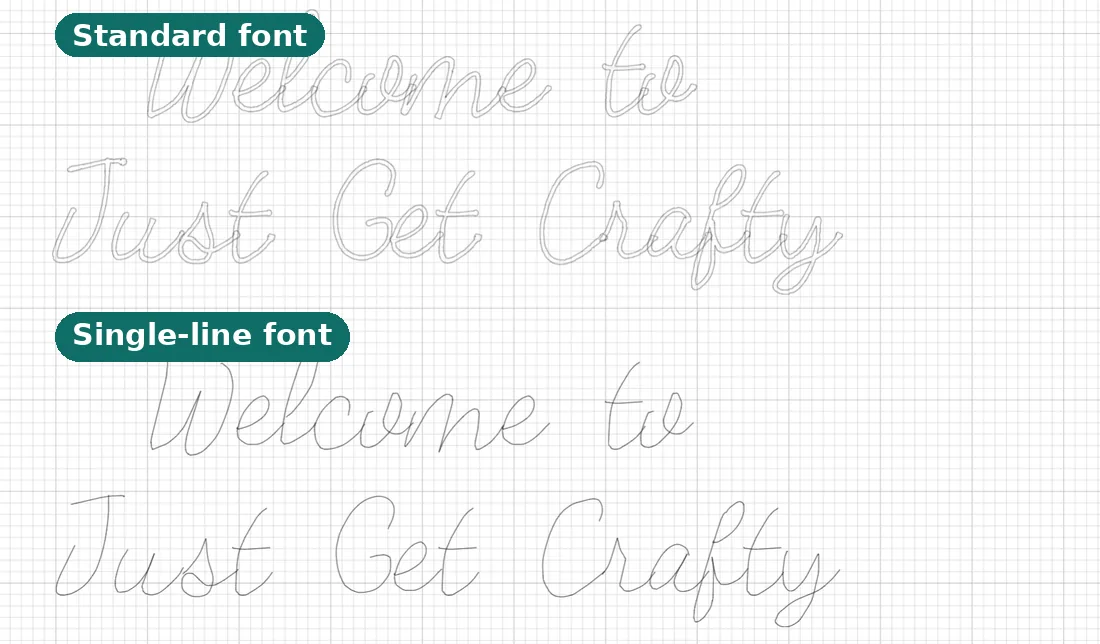
Why give them away? Because they are the best possible demo of what this site does: every one of them was drawn by hand with the same handwriting font generator you can use free.
The free options at a glance
There is more than one route to a single line font, and each has a real catch. Here is the honest comparison before we get into the details.
| Option | What it costs | The real catch | Installs in Design Space? | Best for |
|---|---|---|---|---|
| Our free fonts | Free, no account | A curated set, not thousands | Yes, as System fonts | Writing with your Cricut today |
| Cricut writing fonts | Usually a paid subscription | Most need Cricut Access; the free ones rotate | Yes, built in | If you already pay for Access |
| Hershey and EMS fonts | Free | Live inside Inkscape, never reach Design Space | No | Pen plotters and Inkscape |
| Free "sample" single line font | Free (one sample) | Quality varies; some are outlines in disguise | Sometimes | Trying one before you buy |
| Convert a font you own | Free to preview | Clean download needs Pro | Yes | Matching a font your project already uses |
| Draw your own handwriting | Free to preview | Clean download needs Pro | Yes | A font nobody else has |
Why truly free single line fonts are rare everywhere else
This is the part most guides skip, and it is the thing worth understanding. Every normal font stores each letter as a filled outline: the path travels around the edge of the stroke and loops back to enclose a solid shape. That closed loop is exactly what a blade cuts and what a printer fills. Font formats have no built-in idea of an open, one-stroke letter.
So font makers fake it. They draw the outline straight out along the centre of the stroke and then back over itself, so the return line lands right on top of the first. Technically it is still a closed loop, but a pen following it draws one clean line instead of two edges. Doing that carefully for every letter, number, and mark is slow hand work, which is why genuinely free single line fonts are scarce, and why so many "single line" downloads are just ordinary outline fonts in disguise.
Here is the nuance that surprises people: even Cricut's own writing fonts are not literally drawn in one pass. A well-built one retraces so precisely that the return line hides on top of the first and it looks like a single clean stroke. A poorly built one shows visible doubling. There is no such thing as a magic one-pass font format, only fonts that retrace well and fonts that do not. If you want the full explanation, see What is a single line font?.
The zoom test: check before you trust any download
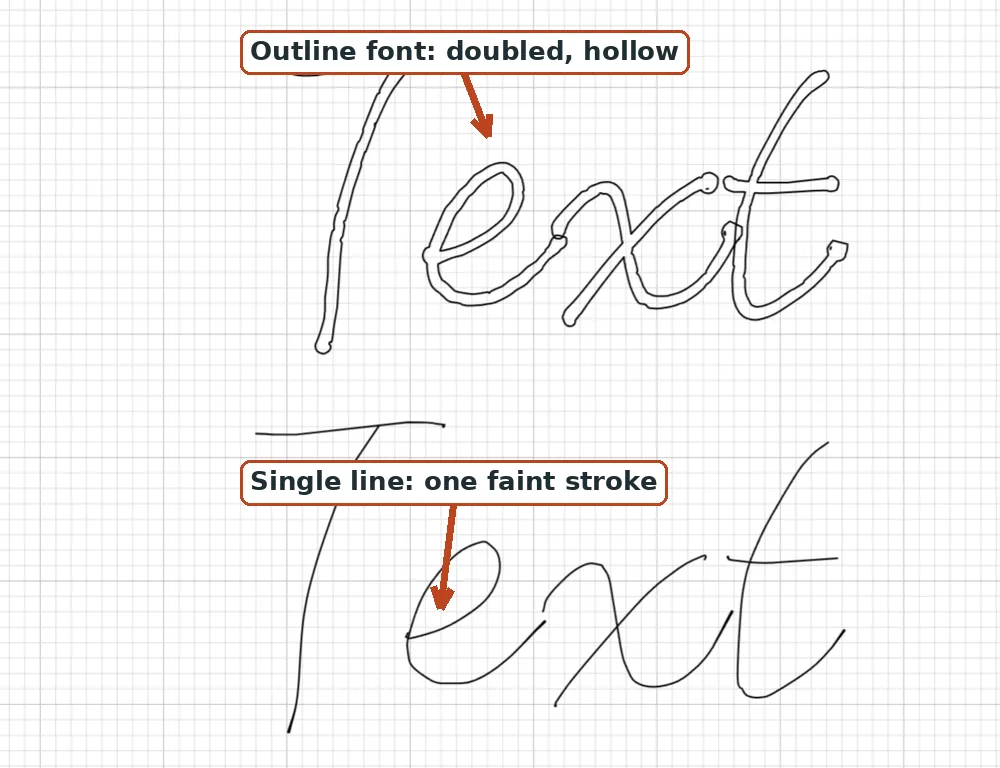
Before you trust any "free single line font," run the ten-second zoom test. Open the file (or the preview) and zoom way in on one stroke.
- One hairline with no interior means it is a true single line font. A pen draws it as one stroke.
- Two visible edges with a thin sliver between them means it is an outline font wearing a costume. A pen will trace both edges and give you hollow bubble letters.
It also helps to know what you actually downloaded, because "SVG font" and "single line" get thrown around loosely. This table sorts out the four things people end up with.
| What you downloaded | What it actually is | Single line? | Works in Design Space? |
|---|---|---|---|
| Normal TTF or OTF | Filled outline letters | No | Yes, but draws as bubbles |
| "SVG font" (a folder of a.svg, b.svg, c.svg) | Per-letter cut files, not a font | No | No, will not open as a font |
| Hershey or EMS SVG stroke font | An Inkscape stroke font | Yes | No |
| True single line TTF | A retraced centerline font | Yes | Yes |
The genuinely free options, with their catches
Hershey and EMS fonts (free, but for plotters)
The oldest single line letterforms are the Hershey fonts, created in the 1960s by Dr. Allen Hershey at the U.S. Naval Weapons Laboratory for early computer displays. Each character is built from straight vector strokes, so they are genuinely single-stroke. Today they are free inside Inkscape's Hershey Text extension (under Extensions, then Text), which has shipped with standard Inkscape for years and also bundles a set of open-source EMS single line SVG fonts.
The catch: these are SVG stroke fonts that live inside the Inkscape extension, not installable TTF or OTF files. They do not appear in and cannot be installed into Cricut Design Space. They are a great answer for pen plotter work, an AxiDraw, or anything you drive from Inkscape (and if you go that route, our plotter SVG optimizer can reorder the strokes to cut pen travel). They are not a Design Space answer.
Cricut's own writing fonts (free-ish, sometimes)
In Design Space, open the font panel, click Filter, and choose Writing to see fonts designed for a pen. Cricut Access fonts carry a small green "a" badge. A few writing fonts are truly single-stroke and draw beautifully; others still show doubling when you zoom in. The bigger catch is money: most writing fonts require a paid Cricut Access subscription or a per-font purchase, and the genuinely free ones rotate in and out, so a specific "free" font today may not be free next month. If you already pay for Access, it is worth testing a writing font with the zoom test before you build a whole project around it. More on the difference between writing and cutting fonts in Fonts that write, not cut.
Free sample single line fonts
Some font shops offer one free single line font as a sample to show off their paid catalog. Quality varies a lot, and a few "single line" samples are really outline fonts, so the zoom test is again your friend. One good free sample is worth grabbing; just verify it before you rely on it.
Make your own: convert a font, or draw your alphabet
The ready-made fonts above are free outright. If you want something of your own, everything here is free to create and preview, and you pay only when you download the clean installable file.
- Convert a font you already own. The font to single line converter turns any OTF or TTF into a true centerline version that keeps the original spacing, and shows you the result before you decide. If your project already has a font picked, this keeps the writing matching. Conversion quality depends on the source: clean monoline and script fonts convert crisply, high-contrast serifs are rougher.
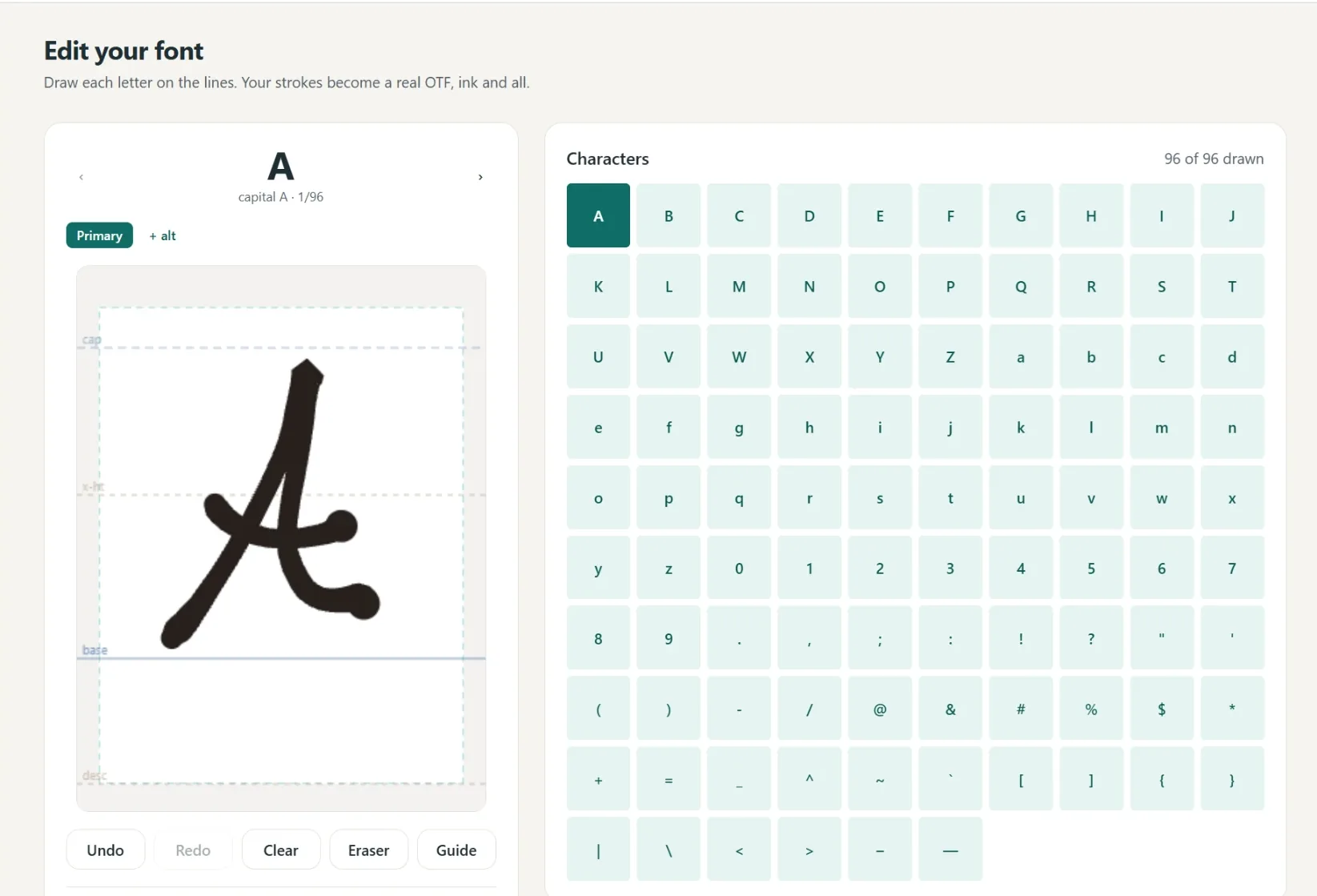
- Draw your own from scratch. The handwriting font generator lets you draw a full alphabet in the browser (no scanner, no printing) and preview the whole result, both the normal font and the single line version. A font of your own handwriting is the one font nobody else's projects have.
This is also where a common mix-up gets cleared up. Tools like Calligraphr turn your handwriting into a font, but they output a standard outline font, so a pen draws it as bubble letters. Our generator gives you both a normal installable font and a matching single line version built for the pen. If you are weighing the two, see StrokeScript vs Calligraphr and how to make a font from your handwriting.
When you want the clean, watermark-free file of a font you made or converted, Pro is $6 a month or $48 a year, includes the commercial license, and covers every tool on the site. One month is enough to make and download a font you keep forever.
Once you have picked one, setting it up
Whichever font you land on, an installed TTF sets up the same way, and it is a short job: install the font, restart Design Space, set the Operation to Draw, and Attach. The step-by-step with screenshots is in how to use single line fonts in Cricut Design Space, and the whole topic hub lives at single line fonts for Cricut.
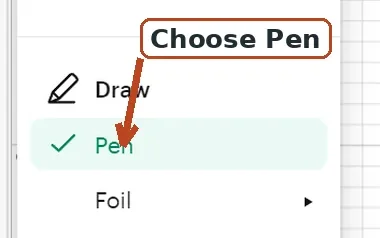
One thing worth flagging while you are comparing fonts, because it changes which ones you should even consider: you do not change the Style dropdown to "Writing" for an installed single line font. The Style-equals-Writing option only exists for Cricut's own multi-style fonts, which is a big part of why Cricut's catalog and a third-party TTF feel so different to work with. An installed single line font is already single-line geometry, so you just set the Operation to Draw.
Which pen tip renders single line best
A single line font is one thin stroke, so a fine tip shows it off and a thick marker can blur the detail. Cricut's durable pens carry a size code on the barrel.
| Pen | Tip size | Barrel code | Best for |
|---|---|---|---|
| Extra Fine Point | 0.3mm | XF | The crispest single line detail |
| Fine Point | 0.4mm | F | Everyday single line writing |
| Gel | 0.8mm | G | A bolder look with less fine detail |
| Marker | 1.0mm | None | Headlines and fills, hides fine gaps |
For most single line writing, the Extra Fine (0.3mm) or Fine Point (0.4mm) gives the cleanest result. Sizes and codes are typical of the current lineup and can change with new releases.
Single line, foil, and engraving
Single line designs are ideal for foil because each line gets traced exactly once. That works for both the heated We R Memory Keepers Foil Quill and the Cricut Foil Transfer tool (which uses the Foil operation). An outline font, by contrast, foils as a hollow outline instead of a solid stroke, so fine single line art foils best. See best fonts for foil quill and our foil quill fonts collection.
The same "trace once" logic is why single line fonts are the right choice for engraving and for addressing envelopes at speed. If you work from images rather than type, the image to single-line SVG converter can trace artwork to a single pen line the same way.
Troubleshooting single line fonts
- The pen wrote hollow or bubble letters. Either the font is a normal outline font, or your Operation is set to Cut instead of Draw. Use a true single line font and set Operation to Draw. The full fix is in why is my Cricut writing in bubble letters.
- The drawn lines will not stay put on Make It. Right-click the text, choose Ungroup, then re-select everything and click Attach. Attaching is what keeps the writing anchored to its layer.
- Letters break apart at the joins. Try Weld on the text; it can help some fonts draw continuously through connected letters.
- The font looks faint and thin on screen. That is normal, not a defect. A single line font is one hairline with no fill, so it renders pale at normal zoom in Design Space and previews. It still draws correctly with a pen.
Frequently asked questions
Are there any truly free single line fonts for Cricut?
Yes, but few. We host free single line TTFs with no account on our free single line fonts page. Cricut's own writing fonts usually require a paid Cricut Access subscription, and the classic free ones (Hershey and EMS) are single-stroke but only work inside Inkscape, not Design Space.
Do Hershey fonts work in Cricut Design Space?
No. Hershey and EMS fonts are SVG stroke fonts that live inside Inkscape's Hershey Text extension, not installable TTF or OTF files, so they never appear in Design Space. They are built for Inkscape and pen plotters like the AxiDraw.
Why is my Cricut pen writing in outline or bubble letters?
Your font is a normal outline font, so the pen traces both edges of every stroke, or your Operation is set to Cut instead of Draw. Use a true single line font and set the Operation to Draw to get one clean stroke.
Do I need to set the Style to Writing for an installed single line font?
No. The Style-equals-Writing option only applies to Cricut's own multi-style fonts. An installed third-party single line font is already single-line geometry, so you just set the Operation to Draw and Attach.
What pen size is best for single line fonts?
A fine tip. Cricut's Extra Fine Point (0.3mm) or Fine Point (0.4mm) shows the single line crisply. A thick 1.0mm marker can hide fine detail and make thin single line letters look blobby.
Can I make my own single line font?
Yes. You can convert any OTF or TTF you own into a true centerline version that keeps its original spacing, or draw an alphabet in your own handwriting and get both a normal font and a matching single line version. Both are free to create and preview.
Why do single line fonts look so faint on screen?
Because each letter is a single hairline with no fill, it renders thin and pale at normal zoom in Design Space and previews. That is expected, and it draws correctly with a pen.
The verdict
Ranked by what you actually get for nothing:
- Our free fonts are the only genuinely free option on this list that installs into Design Space with no account and no subscription. Download them here.
- Hershey and EMS are genuinely free and genuinely single-stroke, but they live inside Inkscape and never reach Design Space. Perfect for pen plotters, useless for Cricut.
- Cricut Access writing fonts are excellent when they are good, but "free" here usually means a paid subscription, and the free ones rotate.
- Free samples from font shops are a coin flip. Run the zoom test before you build a project on one.
Once you have picked a font, the setup and the wider topic are covered at single line fonts for Cricut. And when you want a font nobody else has, converting one you own or drawing your own alphabet are both free to create and preview.
Try it while you're here
Your words in real fonts made from real handwriting with this tool.
Loading fonts…
True single line fonts, free with no account. Test them with your own words first.
Download free fontsFree to try, no account needed. Pay only when you keep a font.